(Update: my second-ever successful DMR activity was participation in the July 18, 2026 World Wide Check-In.)
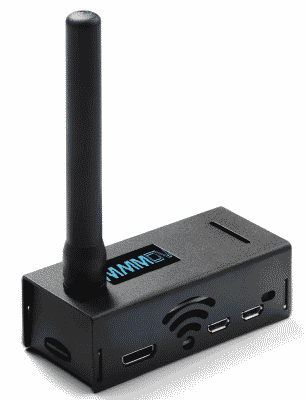
It turns out that there is a thing called DMR or digital mobile radio (Wikipedia article). This is a thing that some radio amateurs do. To do DMR, you use a “hot spot” such as the one shown at right. It uses an antenna to transmit and receive on the 70-centimeter radio band, and it connects to the Internet via wifi.
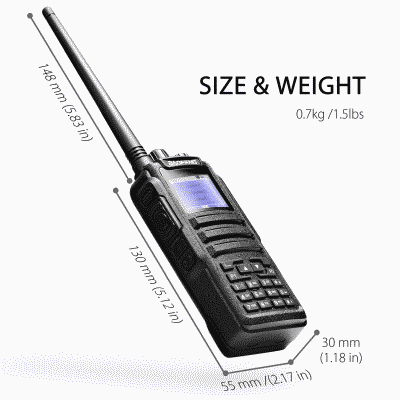
To communicate with the hot spot, I use this Baofeng DM-1701 handheld radio (manufacturer’s web page) which cost $59. (The hot spot cost $110 on Amazon.) I the factory-installed firmware of the Baofeng transceiver and installed special firmware called OpenGD77 (Github page) that is made by hams. With the help of a local ham, I used special software called OpenGD77 CPS (downloads page) to configure the radio.
I configured the hot spot with software called WPSD (which stands for W0CHP-Pi-Star-Dash). You can see its web site here.
Inside the housing is a Raspberry Pi Zero 2W computer, wearing a “hat”. The hat is an MMDVM (a multi-mode digital voice modem) containing a software-defined radio.
Everything about this is free and open-source software, created by various volunteers.
A next step was to obtain something called a Radio ID, which proves that I have a ham radio license. My new Radio ID is 3224591.
A next step was to set up an account with a system called Brandmeister.
I then programmed the Radio ID and the Brandmeister credentials into my hot spot.
After this, what I did was to set up a “channel” and a “contact” in my radio to make use of a DMR “parrot”. A parrot listens to what you say, and repeats it back to you. The particular parrot that I chose to use is called “talk group 9990”. (See a web page about talk group 9990.) Using my radio, and connecting with my hot spot, I pressed the push-to-talk switch and spoke. I explained that I am AA2KW making use of the DMR parrot.
A moment later, I heard my own voice repeated back to me. This came to me from a server located in San Jose, California.
This confirmed that against all odds I had somehow successfully configured both the radio and the hot spot.
The next thing that I did was to select a “talk group” that might have some other people on the group. I chose talk group 31088 (see a web page about it) which is for the state of Colorado. I pressed the push-to-talk switch and spoke. I explained that I am AA2KW making use of talk group 30188 and that this is my very first time trying to use DMR to talk to another human being.
What happened next is that I was greeted by someone with call sign ND9DW. It turns out this is someone named Dave in Greenville, Wisconsin. He asked what equipment I was using and I described it to him. He congratulated me on successfully configuring my devices. He explained that his is also using a hot spot (very much like mine). His radio is a Motorola radio. We finished our chat and the radio went silent.
Later the radio chirped back into action. It was someone with call sign KJ7DWA. He was Ed in Gig Harbor, Washington listening for anyone who might be on the talk group. I responded, explaining that this was my second-ever contact via DMR. He likewise congratulated me on successfully getting my equipment working.
I have much to learn. I expect at some point I will get to where I can do complicated things like selecting a new talk group and moving from one talk group to another.
“The medium is the message.” Marshall McLuhan
“It’s the trip not the destination” Someone, I’m sure
“It’s the metadata, not the data” Newton White, and probably many others before – of whom he is blissfully unaware.
HAM radio – a chance to talk to each other about setting things up to be able to talk to each other – any passing of substantive traffic is an unintended byproduct – collateral communication.
Sadly, I am finding it hard to resist the temptation to go down this interesting rabbit hole … Oops. I just looked at my to do list. What a buzz kill that thing is.