The alpha testers of Patentcenter began their work in summer of 2018, and immediately found many things that needed fixing in Patentcenter. This blog article describes the complete failure of USPTO’s Ideascale system, which supposedly was to provide a way for the alpha testers to report the things that needed fixing. Continue reading “USPTO’s Ideascale — where good ideas go to die”
When you upload a document in Patentcenter as part of an e-filing task, sometimes Patentcenter will make a guess as to the document description that makes sense. Other times, Patentcenter will quietly offer a hint that maybe you should provide a document description. That hint is communicated by a text-free rectangle as shown at right. At this point you are on the “upload documents” page of Patentcenter. Suppose you click “continue”? What will happen next?
Of course what should happen next is that the “continue” button should be grayed out. It should not even be possible to click “continue”. Patentcenter should politely decline to move on to the next page.
Or, if the designers failed to gray out the “continue” button, then what should happen next is that Patentcenter should put a big red border around this “hint” rectangle, and provide some words on the screen to communicate that a document description is going to be required before Patentcenter will allow you to move on to the next page.
But the designers of Patentcenter got this one wrong. What happens next is that the “continue” button just works the way it always does. Patentcenter moves on to the next page, which is the first of two “calculate fees” pages. Suppose you click “continue”? What will happen next? What happens next is that Patentcenter moves on to the second of two “calculate fees” pages. (Why is the “calculate fees” function spread out over two separate screens? The developers have argued that this is somehow a feature, not a bug. The developers say that this somehow saves time and trouble for filers. For me, since many of my e-filing tasks do not involve paying money, all this does is frequently waste my valuable time as I sit through through two screen-loads and mouse-clicks and hourglasses.)
Suppose you click “continue”? What will happen next? What happens next is that Patentcenter moves on to the next page, which is the “submit” page. Note that nowhere on this “submit” page is there any warning that anything is amiss about a document description.
Note that in any competent user interface design, the “submit” button should be grayed out right now, given that the document description is missing. But the “submit” button is not grayed out.
click to enlarge
Suppose you click “submit”? What will happen next? Yes, three screens too late, Patentcenter finally gets around to mentioning that it feels you need to provide a document description for the uploaded PDF file. You can see this tardy error message quoted at right.
It is easy to see what the developers of Patentcenter need to do to fix this. Patentcenter needs to gripe promptly, right there on the “upload documents” page, and the “continue” button on that “upload documents” page should be grayed out until such time as the needed document description is provided.
What’s particularly sad about this is that I first reported this defect in Patentcenter (saving up a real or imagined defect regarding an uploaded document and springing it on the filer only three screens later when he or she tries to click “submit”) in my role as an alpha tester in January of 2019. I reported it in Ideascale, that place where suggestions and trouble reports go if they wish to be ignored. In other words, USPTO has known about this defect in Patentcenter for more than a year now and has not fixed it.
When we e-file a document in EFS-Web or in Patentcenter, our habit is go to later into Private PAIR or Patentcenter to look in IFW to see what is actually there. The goal is to compare what is actually there with what we think we e-filed. In an ideal world “going later to look in IFW” would not even be needed because the USPTO systems would always faithfully store exactly what we uploaded. But regrettably often, what is in IFW diverges from what we uploaded. The divergences if you use EFS-Web are familiar and frequent users of EFS-Web usually know what to expect, for example any image containing color or gray scale will get ruined by USPTO’s ill-conceived halftoning.
But if the user is using Patentcenter for the e-filing, there are scary ways that IFW can diverge from what the filer uploaded. One way is that entire documents are often missing. In one of our new applications that we e-filed yesterday in Patentcenter, what should have appeared in IFW were eighteen documents. Instead, shortly after filing, only four documents appeared in IFW. Even now, some twelve hours later, fourteen documents are missing from IFW.
And of course Patentcenter does not have “last 40 ack receipts” like EFS-Web, so there is no way for the filer who used Patentcenter to prove that the filer really e-filed fourteen documents, unless the filer was so paranoid as to download and preserve the Patentcenter ack receipts at the time of filing. In this particular case I am not very worried because among the missing fourteen documents was a fee payment, and the fees do show up in the “fees” tab as having been paid.
But what is very scary is Patentcenter converting a perfectly good PDF file into a blank sheet of paper.
click to enlarge
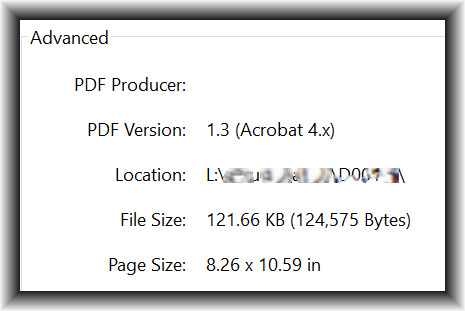
In this case what I uploaded was a PDF file that was one page in length. The PDF had dimensions of 8.26 by 10.59 inches as may be seen at right. (The way this PDF came into existence is that a human being scanned a physical paper document on a Brother MFC printer-scanner into an emailed PDF file.) When I uploaded it into Patentcenter, the validation message was “the page size is too large … the page should be 8½ by 11 or A4 … the page will be resized”. I did not mind at all if Patentcenter were to resize the page. This would simply mean enlarging it by about three percent, or maybe tacking on a few pixels around the edges to pad it out to 8½ by 11. No problem. So I clicked “submit” in Patentcenter.
Here is the scary part. What you now see in IFW is a blank page. Perfectly blank.
I did some image analysis on the blank-page PDF that Patentcenter stuffed into IFW instead of my normal-looking scanned PDF that had lots of ink on the page. The blank-page PDF is one bit per pixel, which is perfectly normal for IFW. And the PDF metadata say that its dimensions are 8½ by 11 which is normal for IFW. But the pixel count is 2482 by 3179, which is not at all normal. At 300 dots per inch, an 8½ by 11 inch page should be 2550 by 3300 pixels.
Yes, the alert reader will realize that the pixel count of 2482 by 3179 is a telltale. At 300 dots per inch, this pixel count translates to … wait for it … 8.27 by 10.59 inches. Yes, Patentcenter “resized” the PDF but only by tampering with meta-data, not by actually resizing the document.
In my case, yes I saw that this mistake in the design of Patentcenter had led to a perfectly good PDF getting converted to a blank page. So I went back to the original PDF and printed it to CutePDF, using the “fit to page” option to resize it to 8½ by 11. I then e-filed the resulting PDF file in Patentcenter and it now appears in IFW and it looks perfectly normal, with ink on the page.
But the filer who simply trusts that Patentcenter will faithfully load each PDF file accurately into IFW could get burned by this sort of flaw in Patentcenter. There is unfortunately no substitute for going and looking in IFW each time you e-file something in Patentcenter, just to see whether something got changed to a blank page. Or to see whether fourteen out of eighteen pages got lost.
Quite by accident today I stumbled upon the good news that USPTO fixed two bugs in Patentcenter, permitting us to clear two Patentcenter trouble tickets today. The cleared trouble tickets are:
CP1 — Web-based Form 85B loses initial capitalization for assignee city name (see article)
The trouble ticket page has been updated accordingly. This leaves twenty-one outstanding trouble tickets.
Of course what we can hope for is that eventually the Patentcenter developers will establish an outbound communications channel with the beta testing community, and will let us know when they fix a bug or add a requested feature. Until then, it will be a matter of our stumbling upon the fact of a bug having been fixed or a desirable feature having been added.
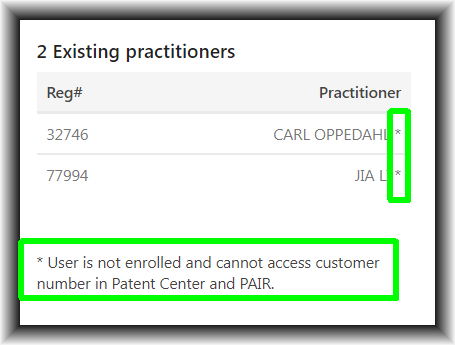
Patentcenter incorrectly lists every user as “not enrolled”. Patentcenter incorrectly says that every user “cannot access customer number in Patent Center and PAIR.”
To see this, log in at Patentcenter, click on “Manage”, click on “Manage customer numbers”. Then click on any customer number in your list. You will see that every user is flagged as being “not enrolled”.
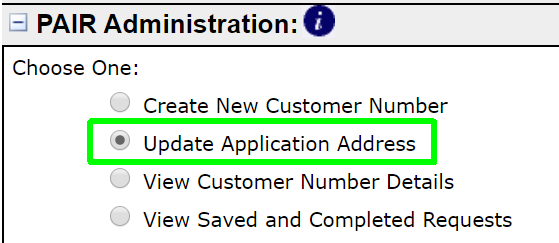
The “Update Application Address” function is an important part of Private PAIR. The corresponding function is missing from Patentcenter. This is feature request FR19.
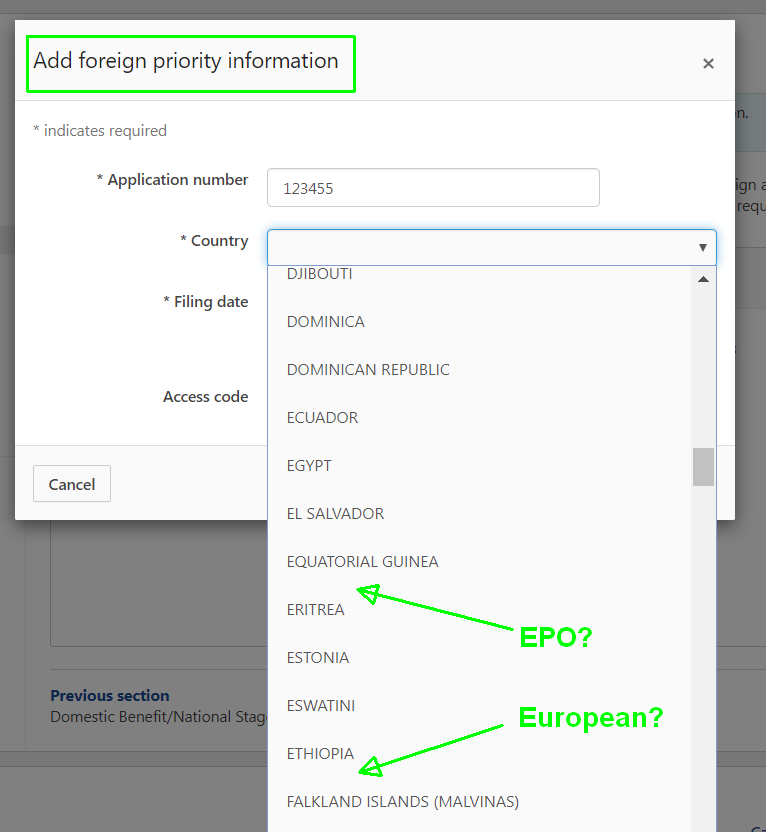
Six months have now passed since I first reported this problem to the EBC. Still it has not been fixed. EPO is missing from the Web-based ADS function in Patentcenter!
EPO is in the web-based ADS function in EFS-Web. But it is missing in the corresponding function in Patentcenter. This is bug report CP9 and you can read about it here.
This would be so very easy to fix. It would be a matter of adding one line of text in a list item on a web page.
Without comment or explanation, the developers of Patentcenter have removed the Corrected ADS function from Patentcenter. In this April 30 blog article I reported that it was buggy. This became bug report CP4. Now it’s gone from Patentcenter.
When Patentcenter launched in alpha test in September of 2018, one of the first things that the alpha testers pointed out was that an important feature from EFS-Web was missing — the last 40 acknowledgment receipts. Continue reading “Imminent: last 40 ack receipts in Patentcenter”