If we have a PCT application filed in a receiving office other than the USPTO, will the USPTO record an assignment against that PCT application in advance of US national phase entry?
For example: For PCT/CN2019/123456, I have an executed English language assignment. If I file it via EPAS with the CN PCT number, will the USPTO record it?
The USPTO will record any document affecting title with respect to any US patent application. And any PCT application that designates the US counts as a US patent application (35 USC § 363) regardless of whether or not the US national phase has been entered. From this it follows automatically that the USPTO will record any document affecting title with respect to any PCT application that designates the US. (Socrates is a man, all men are mortal, therefore Socrates is mortal, that kind of thing.) You get the same answer to this question no matter which Receiving Office happens to have been selected by the filer. And it is the same answer regardless of whether the US national phase has or has not been entered. Such a recording may be carried out before the US national phase has been entered, and may be carried out even if the US national phase entry never actually happens. Such a recording may be carried out even after the international phase has ended (in other words, it can happen after the end of the 30-month period).
Actually nobody at the USPTO, no computer system at the USPTO, ever actually checks to see whether the PCT application actually designates the US. Thus actual observed behavior is that the USPTO will record any document affecting title with respect to any PCT application no matter whether or not it designates the US.
And of course the recordation is free of charge — no government fee.
And of course anyone can carry out the recordation — there is no requirement that the filer be a registered practitioner or have an address in the US.
Which then brings us to 35 USC § 261, which reminds that it is a Best Practice (indeed almost malpractice avoidance) to record any assignment within three months of its date of execution. So for example if a PCT application (designating the US) were to be assigned, it would be a Best Practice to record it at the USPTO within three months. This would be the case regardless of the Receiving Office in which it had been filed.
The alert reader might wonder, if we record against the PCT application number, and later enter the US national phase, will the recordation automatically cover the US application number? You can see the answer here.
Suppose that there were a computerized system operated by a government agency where the paying customer pastes text characters into the system. Suppose the text were really important text that needs to appear at a later time in a prominent place on an official government document that bears a gold seal and the signature of the Undersecretary of Commerce.
The normal sensible thing would be for the text characters to get auto-loaded into the system that prints the official government document, right?
If you were going to make up a hypothetical example of what would be really stupid, your hypothetical example might be that after the customer pastes the text characters into the government system, the government agency flattens the text characters into a TIF image. And then the government agency carries out OCR (optical character recognition) to recover the text characters for the system that prints the official government document. And then the document gets printed, and the gold seal is applied, and then the Undersecretary of Commerce signs the document. In your hypothetical example it would be stupid to do it that way because the Office already was in possession of the actual characters, and anyway the OCR workflow costs money, and every now and then the OCR system might make a mistake. Of course it would be better to auto-load the text from the first computer system into the second computer system.
Well, you can’t make this stuff up. What the USPTO actually does is actually stupider than what you would make up. Yes, several hundred times per day, every time somebody pays an Issue Fee using the web-based issue fee payment system, the customer pastes text characters for the assignee name, the city of the assignee, and the “attorney, agent or firm” into a special page in EFS-Web. These text characters are all to be printed on the front page of the issued patent. And yes, after the customer clicks “submit” in EFS-Web, the USPTO flattens the information into a TIF imagein IFW. But what you wouldn’t be able to make up is that USPTO does not even use OCR on those images. Just a few days after USPTO flattened the text into image format, a human being views the TIF image on a screen and hand-keys the information into the system for printing the US patent.
No, you can’t make this stuff up.
The way that the TIF image got generated by EFS-Web is that it was vector-rendered by a computer from text character information. This means the OCR would in fact be very close to 100% accurate if the USPTO were to use that path for recovering the characters. But USPTO does not even use OCR to recover the text from the images. The USPTO uses hand-keying by a human being to recover the text from the images.
Oh and the amount of time that passes during which this character information is temporarily stored in image format? Only a few days. The customer pays the issue fee on some particular day, and the Final Data Capture happens maybe a week later.
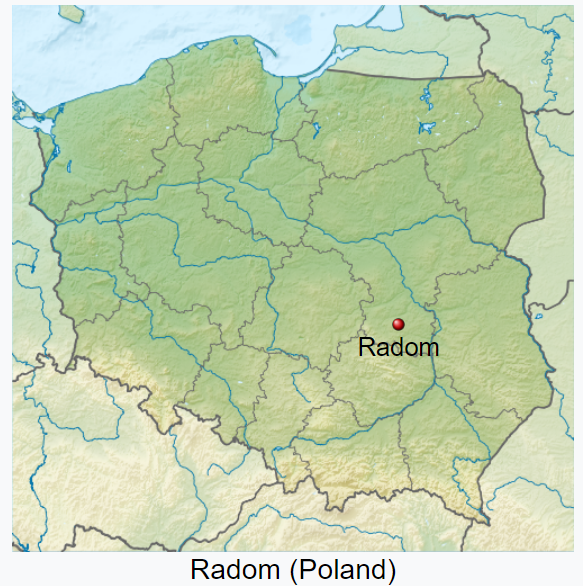
Let’s look at some real-life examples. The map above shows Radom, Poland, which I understand to be the fourteenth-largest city in Poland, having a population of over two hundred thousand people. Radom is also the home of a company (my client) that has over the years paid to the USPTO well over a quarter of a million dollars in Filing Fees, Search Fees, Examination Fees, Issue Fees, and Maintenance Fees relating to its inventions.
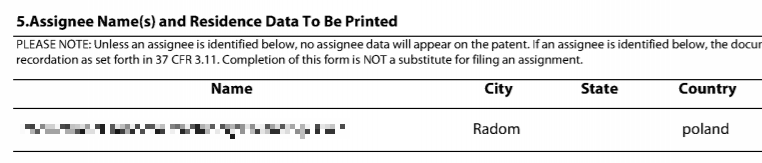
A few months ago I paid yet another Issue Fee to the USPTO on behalf of this client. I used the web-based Issue Fee system in EFS-Web. Here are the characters that I pasted into USPTO’s web-based form 85B:
click to enlarge
And here is what USPTO printed on the front page of the patent that the USPTO issued a couple of weeks ago:
click to enlarge
Yes, some human being saw the five letters “Radom” on a computer screen and typed the six letters “Random” into a keyboard.
Long-time readers of this blog will recall that I blogged with some enthusiasm about it when the USPTO first launched this web-based issue fee payment system in September of 2015. In November of 2015, I blogged with disappointment that it had become clear that USPTO was hand-keying the 85B information from the web-based Issue Fee form rather than auto-loading it.
During the four years that have passed, I would have hoped that maybe my November 2015 blog article would have prompted (or shamed) the USPTO into doing the non-stupid thing with the web-based Issue Fee payment form. The non-stupid thing would be to start auto-loading the text characters from the first computer system into the second computer system.
But even now in 2019, four years later, USPTO continues to take the text characters provided by the customer in the web-based form, and flatten them to TIF images, and then just a few days laterthe USPTO has a human being hand-key those same characters into a second computer system.
It pains me to have to say that this is not the first time that the USPTO caused this exact harm to this exact customer. In 2017 I paid an Issue Fee for this same client, and I used the web-based Issue Fee form. I pasted the five characters “Radom” into the web-based form. And the USPTO human being hand-keyed the six characters “Random” into the system for printing the US patent.
We will, of course, ask the USPTO to provide a corrected patent with the front-page information spelled correctly (not a mere certificate of correction) pursuant to 37 CFR § 1.322(b).
(Update: Maybe prompted by this blog article, it seems that somehow the USPTO found the third page of IDS and got it into IFW. Everything is okay now with this three-page IDS.)
How’s this for a nightmare situation in a pending US patent application? You e-file three pages of Information Disclosure Statements. But only two of the pages find their way into IFW.
TYFNIL we all realize what an adversary could do with this!
Ladies and gentlemen of the jury. The applicant filed three pages of information disclosure statements. You can see that from the Acknowledgment Receipt that is right here in the application file. But only two of the pages got considered by the Examiner. There were twenty US patents listed on that missing page.
Just imagine, ladies and gentlemen of the jury, what a difference it would have made for the Examiner, if the Examiner had had an opportunity to consider those twenty US patents when deciding whether or not to grant this patent!
click to enlarge
Here’s a real-life example. Ten minutes ago I e-filed three pages of Information Disclosure Statements. You can see it right here in this quotation from the ack receipt.
click to enlarge
Then I did what we all do. I looked in IFW to see what I just e-filed. And this is what I see. Yes, only two of the pages of the IDS are visible in IFW.
And it’s the same in the “display references” tab in PAIR.
This is a trap for the unwary. The USPTO e-filing system lost one of the pages of my IDS. Fortunately I noticed that USPTO screwed this up. We will docket to watch closely to see if anyone at USPTO fixes the screwup.
The FOAP (first office action prediction) in this case is 15 months. So hopefully we have a little time to spare for pestering the USPTO to fix this problem.
The USPTO needs to fix EFS-Web so that pages don’t get lost like this.
The moral of the story? Always check IFW very carefully to see whether USPTO lost any pages of whatever you e-filed. And don’t just look for the items listed in IFW. Look at them. You would want to know if, for example, USPTO corrupted the images on those pages or turned them into blank pages.
Have you run into problems like this? Post a comment below.
(Update: It took eight days, but yes the EBC did eventually get this application fixed in IFW. Now we are able to see correctly in IFW what we actually filed in Patentcenter in this patent application. What a relief!)
In a previous blog article I applauded USPTO for doing real alpha-testing of its Patentcenter system with real revenue customers. And invited readers to recognize the contributions of the alpha testers themselves, who for more than a year now have been doing real patent filings in this system which will some day replace both EFS-Web and Private PAIR. Here is an example of what it is like to be an alpha tester. Continue reading “An example of alpha-testing Patentcenter”
The USPTO has, over the decades, had a bit of a spotty success rate at designing e-commerce systems. This blog article highlights two reasons to allow yourself some guarded optimism in this area — the fact that USPTO is doing real alpha-testing of its Patentcenter system, and that a small but very active core of USPTO customers are carrying out very aggressive alpha-testing of that system. Continue reading “You can thank your alpha-testers (and you can thank the USPTO)”
(Update: Forty-two Patent Practitioners have written to Director Vidal about this. See blog article.)
If your path for getting a US patent from a PCT application is entry into the US national phase, keep in mind that the Patent Prosecution Highway is a joke these days. Continue reading “PPH does not mean much in 371 cases”
(Corrected September 1, 2019 to reflect that the telltale Microsoft Word file-type icons appear in the Patentcenter e-filing system, not in EFS-Web.)
USPTO presents patent practitioners with a choice of two filing paths — Microsoft Word and PDF. If you e-file a Microsoft Word file, then that’s what USPTO wants. If you want to use a word processor other than Microsoft Word, then you face two possible paths. One path is that you save your patent application as a PDF. USPTO has proposed that you would have to pay a $400 penalty for e-filing the PDF. The other possibility is to export your patent application in a DOCX format from your non-Microsoft-Word word processor. You would then upload the DOCX file to EFS-Web or to Patentcenter (in alpha-test), and EFS-Web or Patentcenter would render the file into a PDF. You would then be expected to proofread the PDF carefully to detect the corruptions (and there would often be corruptions, documented here) introduced by USPTO’s failure to correctly handle DOCX files generated by word processors other than Microsoft Word. Here is the adhesion contract that EFS-Web or Patentcenter asks you to agree to:
The PDF(s) have been generated from the docx file(s). Please review the PDF(s) for accuracy. By clicking the continue button, you agree to accept any changes made by the conversion and that it will become the final submission.
Again, if you wished to avoid this malpractice risk, you need merely take either of two precautions:
purchase and use Microsoft Word, or
pay the $400 penalty and submit a PDF format patent application.
The situation is that the rendering engine that USPTO uses to render a DOCX file into a PDF is the Microsoft Word rendering engine. So by definition, the PDF that is generated from the DOCX file will be error-free if you used Microsoft Wordto generate your DOCX file. But if you used a word processor file other than Microsoft Word to generate your DOCX file, the rendering engine offers no assurance of rendering the document accurately.
USPTO disingenuously suggests that there is some uniform “DOCX standard” and that somehow all word processor files that have file names ending in “DOCX” will look the same when e-filed in EFS-Web or in Patentcenter, regardless of the particular word processor that was used to create the word processor file. This is factually false.
click to enlarge
USPTO’s disingenuousness is highlighted by the icon that USPTO uses in Patentcenter to identify the type of file that the practitioner has uploaded. You can see it three times in this screen shot.
Yes, USPTO uses the Microsoft Word branded icon to identify the file type for the word processor file that the user has uploaded (that happens to have a “docx” file name extension). For this particular screenshot, the DOCX files that you see are files that I created using Libre Office. But did USPTO use a Libre Office branded icon for those files? No! USPTO used the Microsoft Word branded icon for those files. You can see it right there in the screen shot, three times.
If USPTO were really dedicated to trying to accommodate users of word processors other than Microsoft Word, we would not be seeing the Microsoft Word icon three times in this screen shot.
There do exist plenty of truly generic icons for DOCX file types, but USPTO did not choose to use any of those truly generic icons. Here are some of them:
Let’s see whether someone at USPTO who is responsible for Patentcenter reads this blog and decides to take corrective action. Let’s see how long it takes for USPTO to change Patentcenter so that it uses an icon that is not Microsoft branded to identify the DOCX files that users upload to Patentcenter.
What would really be excellent is if USPTO were to stop using the Microsoft Word rendering engine in EFS-Web and Patentcenter to render DOCX files into PDF files. I think the responsible thing would be for USPTO to use (for example) the Libre Office rendering engine to render DOCX files into PDF files. I say this because I believe the Libre Office rendering engine actually comes much closer to complying with the relevant industry standards (ECMA-376 and ISO/IEC 29500) than does the Microsoft Word rendering engine.
The Korean Intellectual Property Office has quietly rolled out several very nice features in its ISA and IPEA service. PCT filers who pick ISA/KR or IPEA/KR will want to familiarize themselves with these very nice features. Continue reading “Making smart use of ISA/KR and IPEA/KR”
You can see comments which people have submitted to USPTO’s proposed penalty for non-DOCX filings.
Unfortunately the way the Notice of Proposed Rulemaking is written, it mixes together many different issues. So it’s not easy to pick out the comments that particularly address the proposed penalty for non-DOCX filings.
Okay, loyal readers, who among us knows the name of this fitting? I first encountered these fittings a very long time ago, when I was about ten or eleven years old. If you know what this kind of fitting is called, please post a comment below.



 The Korean Intellectual Property Office has quietly rolled out several very nice features in its ISA and IPEA service. PCT filers who pick ISA/KR or IPEA/KR will want to familiarize themselves with these very nice features.
  Okay, loyal readers, who among us knows the name of this fitting? I first encountered these fittings a very long time ago, when I was about ten or eleven years old. If you know what this kind of fitting is called, please post a comment below.